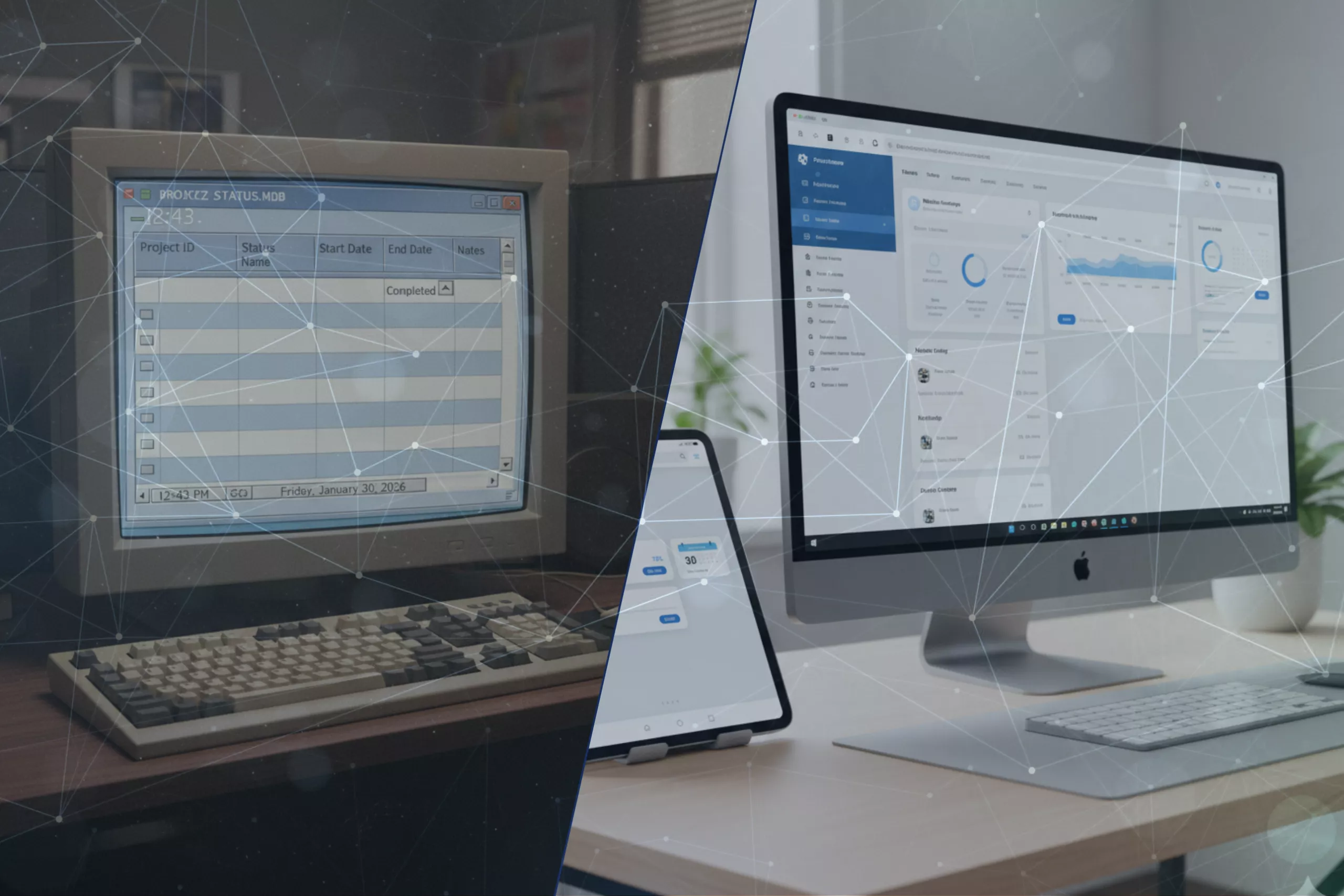

It started with a twenty-year-old Microsoft Access database.
Inspectors relied on it every day to plan, report, and document activities. It had served faithfully for years – until the world around it changed. Integrations became complicated, updates risky, and new compliance demands hard to meet. Yet the system wasn’t “broken”. It contained years of business logic, domain expertise, and proven workflows. Replacing it outright would have meant throwing away hard-won knowledge.
So rather than simply keeping the old system as it was or discarding everything outright, the platform was redeveloped with care. The new web-based platform kept everything that worked but added modern features such as tablet apps for field use, cloud-based synchronisation for offline scenarios, and strong audit trails to satisfy new regulations. The result wasn’t disruption, it was renewal.
Many organisations face the same dilemma. Their legacy systems are vital but ageing, holding the DNA of the business in old code. Legacy System Modernisation, when done with understanding and respect, can protect that value while preparing for what’s next. This article explores how to approach that journey – how to modernise safely, pragmatically, and in a way that strengthens your business rather than unsettling it.
Why legacy bites now
Beyond technology: knowledge concentration, hiring challenges, and auditability gaps
The challenge with legacy isn’t just about ageing code or outdated interfaces. It’s about people, processes, and visibility.
Often, a small group of long-serving employees carry deep knowledge of how the system works. When they retire or move on, that understanding can disappear, leaving organisations with critical systems that few truly know how to maintain.
Recruiting new talent familiar with legacy technologies such as Microsoft Access, Delphi, Visual Basic, C++, FoxPro, but also AngularJS, earlier DotNet versions, and similar platforms is increasingly challenging. Many organisations still rely on business-critical applications built with these tools, as well as integration solutions like BizTalk and TIBCO. As support for these older systems declines and the pool of experienced developers shrinks, clients are seeking partners who can help them modernise and migrate their software to contemporary, maintainable platforms – making our expertise especially valuable for those looking to future-proof their operations.
Meanwhile, expectations around traceability, audit readiness, and data privacy have grown. For example, Article 25 of the GDPR states that software must be built with data protection by design and by default, which may not be the case with old legacy applications and therefore it may be very difficult to rewrite them to be fully compliant. What used to be a dependable, invisible engine can now struggle under the weight of new demands.
The hidden tax of inaction: rising risk, mounting costs, and slower adaptability
Every year a system remains untouched, its hidden costs grow.
Older hardware becomes harder to replace, licences more expensive, and integrations more brittle. The pace of change elsewhere — in customer experience, analytics, and compliance – leaves legacy systems lagging.
Inaction carries a tax: higher risk exposure, slower adaptability, and a steady decline in competitiveness. The system may still “work,” but at the cost of business agility.
What counts as legacy, and why they persist
A modern definition: when yesterday’s solutions hinder tomorrow’s plans
Legacy system is no longer refers only to mainframes humming away in basement server rooms. Increasingly, organisations face limitations from much newer “legacy” technologies – platforms that were perfectly modern 10–15 years ago but no longer integrate well, scale easily, or meet today’s expectations for usability, compliance, and auditability.
In practice, a system becomes legacy not because it has stopped working, but because it slows down progress: it is difficult to maintain, risky to change, and misaligned with modern business needs such as cloud-readiness, mobile-first usage, or data protection by design.
What modern legacy often looks like today
For many businesses, legacy systems fall into one or more of these groups:
- Microsoft Access databases that have grown over time into business-critical tools
- Delphi, Visual Basic 6, or C++ desktop applications that still run key workflows
- Older .NET frameworks (3.5, 4.0, 4.5) deeply entangled with outdated libraries
- AngularJS or early SPA frameworks long past their support windows
- BizTalk, TIBCO, and other ageing integration platforms at end of life
- Custom systems whose original developers are no longer available
- Thick-client Windows apps dependent on RDP, local installations, or on-prem servers
These are the systems encountered most often – not ancient mainframes, but mid-life platforms that still work reliably yet increasingly limit what the organisation can achieve.
Older systems – AS/400, mainframes, or old ERP modules – still exist, of course, but they are rarely the main issue for the organisations we support. Or in those cases they are there, they are often reached via APIs and therefore safely isolated from the main IT systems but still acting as workhorses doing their job. The real pain today lies in the “middle-age” systems that were modern in their time but have not kept pace.
Why they endure: value, familiarity, and embedded expertise
Organisations hold on to these systems for good reasons:
- They encapsulate years of business logic refined through real-world users
- Users know them well, and the workflows remain efficient
- Replacing them feels risky, especially when documentation is limited
- Licence and infrastructure costs are already sunk
- They are often stable, even if outdated
The question, therefore, is not “Why haven’t we replaced it?” but “How do we modernise without losing what works?”
When these systems become a constraint
Even solid, dependable systems eventually start causing friction:
- Integrations become harder to maintain
- Updating or extending the system becomes risky
- Recruiting developers for older tech stacks becomes increasingly difficult
- Compliance expectations around logging, traceability, and privacy outgrow the platform’s capabilities
- Business-critical data gets trapped in formats that are hard to extract or analyse
- The surrounding digital ecosystem evolves — but the older system can’t keep up
This is where modernisation becomes not just a technical exercise, but a strategic necessity.
Mistakes to Avoid
- Throwing away old systems just because they are old
- Replacing systems without understanding their role
- Copying large-enterprise playbooks without assessing fit
- Waiting until vendors, tools, or regulations force your hand
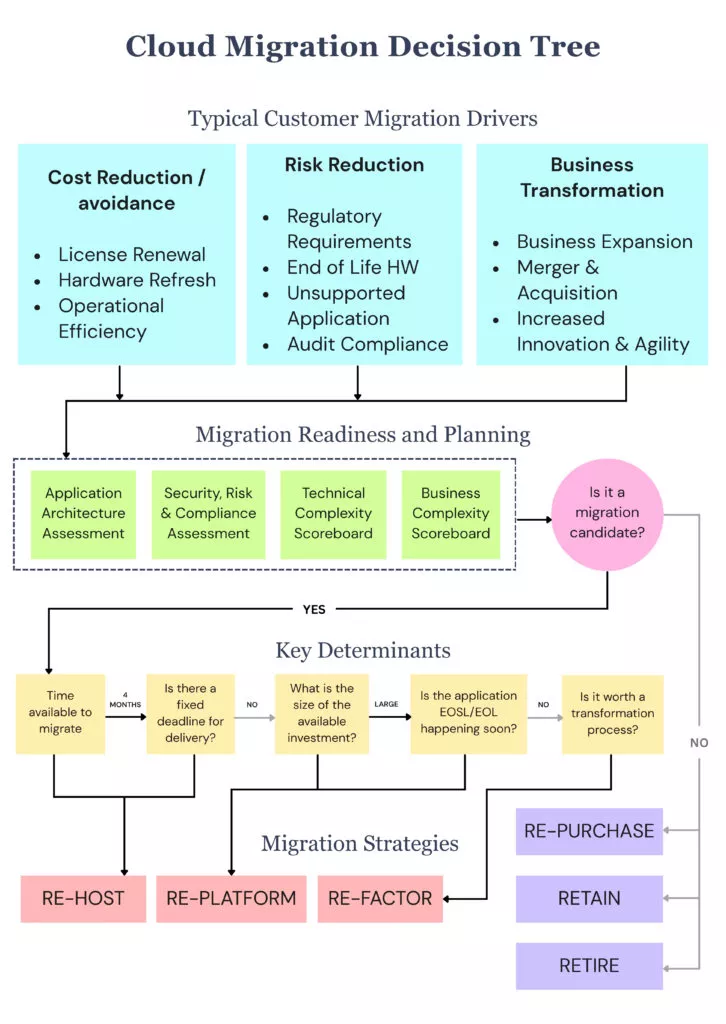
Choosing the right modernisation path
Retain and encase: wrapping with APIs or integration layers
Sometimes, the best way forward isn’t to replace, but to extend.
The “7 Rs” :
Using a decision matrix
A structured decision matrix ensures modernisation aligns with genuine value creation.
Turning Your Legacy System into an Asset
- Building on the stability of trusted workflows
- Extending systems through integration
- Adding AI, analytics, or IoT where they create measurable improvement
- Supporting people through change
Compliance and Security That Endure
- Meeting GDPR, DORA, and NIS2 requirements
- Managing cross-border data
- Reducing vendor risk and avoiding single-cloud lock-in
A practical roadmap to use
- Map systems, data, and dependencies – including who understands them.
- Score risks and opportunities – using a simple heatmap for clarity.
- Define an “MVP modernisation” – a 90-day pilot that proves value early.
- Establish an integration pod – a small, focused team measuring MTTR and lead time.
- Iterate – gradually refactor, retire, or replatform systems in manageable slices.
Why Smaller Partners Excel in Legacy Modernisation
Smaller technology partners often bring what large consultancies can’t – continuity of people, deep technical understanding, and a personal, fit-for-purpose approach. They adapt faster, avoid unnecessary overheads, and deliver predictable outcomes – making modernisation feel less like disruption and more like steady progress.
Frequently asked questions
When does a system become a legacy system?
What are the risks of not modernising legacy systems?
Which technologies are commonly considered legacy today?
How can legacy systems be modernised safely?
Can legacy systems be made compliant with modern regulations like GDPR?
What is the best first step in a legacy modernisation journey?
Conclusion: Modernising without losing what matters
Legacy systems aren’t simply old code -they’re repositories of experience, trust, and unique business logic. Modernisation doesn’t have to erase the past; it can make what already works work better. At Gislen Software, we’ve spent decades helping clients modernise systems thoughtfully, preserving the value already built into them. Because progress isn’t about replacing everything -it’s about carrying forward what’s worth keeping.
If you are considering how to evolve your own systems without unnecessary risk, the best place to begin is with a conversation – a practical discussion about what still serves you well and what no longer does.
Contact us here, We are happy to share what we have learned from working with legacy modernisation in real-world environments.