
Microsoft has announced that the Service Bus Messaging Protocol (SBMP) will be retired on 30 September 2026. This means that the SB-Messaging adapter in BizTalk Server will no longer be supported and may eventually stop working.
Microsoft has released a BizTalk Server 2020 hotfix that adds AMQP support to the adapter.
To avoid disruption and keep integrations running, existing SBMP-based integrations should be reviewed and moved to supported adapters or communication methods.
Why this change matters
If your BizTalk environment still uses the SB-Messaging adapter, the retirement of SBMP may affect your integrations with Azure Service Bus.
The main risks are:
- Communication with Azure Service Bus may fail after SBMP is retired
- Production integrations could suffer downtime
- The solution may become harder to support, maintain, and scale
To reduce these risks, SBMP-based integrations should be reviewed and migrated to supported adapters or communication methods.
Outbound Integration Scenarios (BizTalk to Azure Service Bus)
Proposed Solution
There is more than one way to replace the SB-Messaging adapter. The most suitable option depends on the existing architecture, integration requirements, and long-term strategy.
In many cases, it can be replaced with an HTTP-based integration pattern. One common and relatively straightforward approach is described below:
| Integration Direction | Current Adapter | Replacement Adapter |
|---|---|---|
| BizTalk → Azure | SB-Messaging | WCF-WebHttp |
This approach uses HTTP-based communication supported by Azure Service Bus.
It replaces the SB-Messaging adapter with the WCF-WebHttp adapter, allowing BizTalk Server to communicate with Azure Service Bus through HTTPS REST APIs.
This approach uses the HTTPS support already available in Azure Service Bus.
Instead of using the SB-Messaging adapter, BizTalk can send messages through the WCF-WebHttp adapter and call the Azure Service Bus REST API directly.
For many existing BizTalk solutions, this is a fairly direct change. The integration may not need to be redesigned. Often, the send port can be reconfigured to use WCF-WebHttp, so that messages are sent to Azure Service Bus over HTTPS rather than SBMP.
This makes it a practical option where the main need is to remove the dependency on SBMP before it is retired.
Other possible approaches include:
- Azure Functions as custom middleware
- API Management with Azure Service Bus
- A hybrid integration model using a middleware gateway
- Full cloud modernisation using an event-driven architecture
Migration steps: BizTalk to Azure Service Bus
Follow the steps below to replace the SB-Messaging adapter with the WCF-WebHttp adapter.
Step 1: Replace the adapter
Update the existing send port:
- Replace the SB-Messaging adapter
- Select the WCF-WebHttp adapter instead
Step 2: Update the Service Bus endpoint URI
Go to:
General → Address (URI)
Use the following URI format:
https://<servicebus-namespace>.servicebus.windows.net/<queue-name>/messages
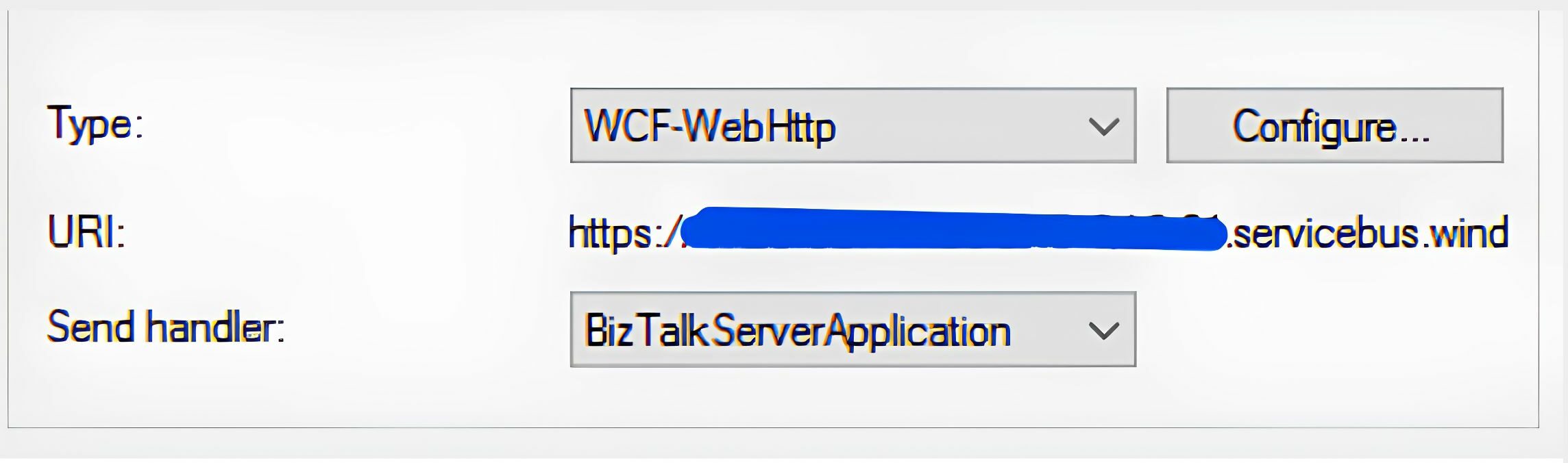
This endpoint is used to publish messages directly to the Service Bus queue.
Step 3: Configure HTTP Method
Go to -> General → HTTP Method and URL Mapping
Add the following configuration:
<BtsHttpUrlMapping>
<Operation Method=”POST” Url=”” />
</BtsHttpUrlMapping>
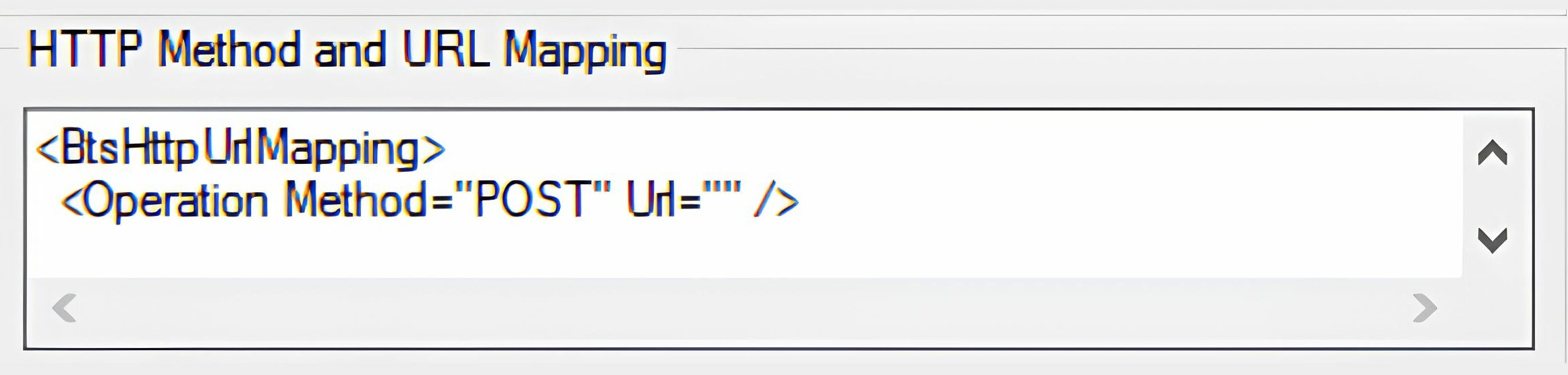
- Ensure the HTTP method is POST, as Service Bus expects message submission via POST requests
Step 4: Configure Security Settings
Under the Security tab:
- Set Security Mode = Transport
- Set Transport Client Credential Type = None
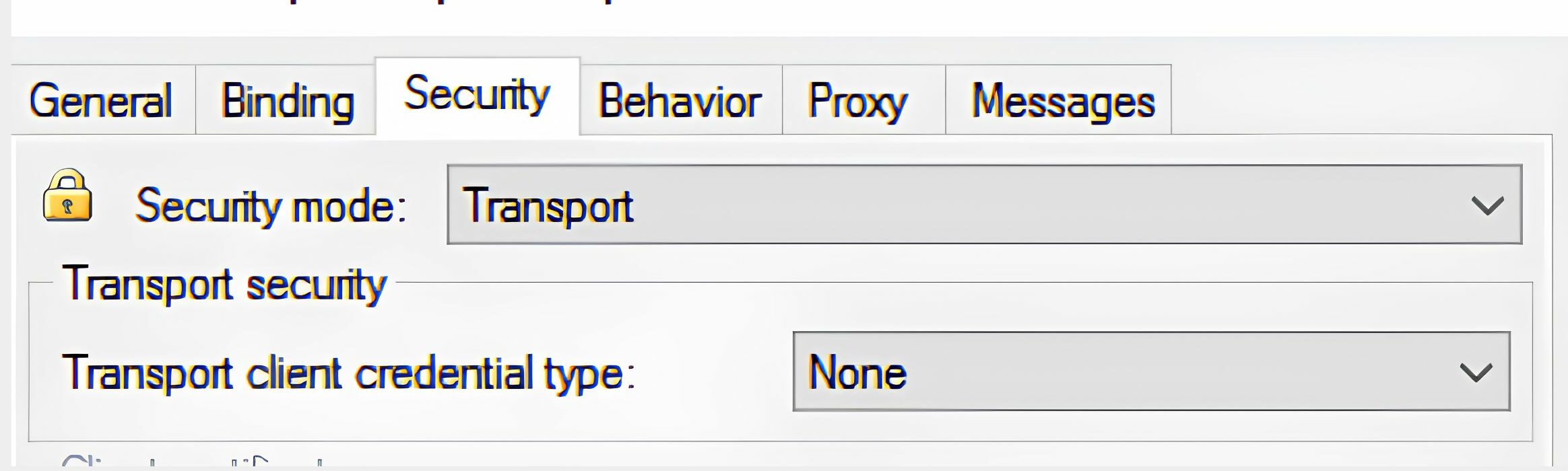
This ensures secure communication over HTTPS without requiring client credentials at this layer
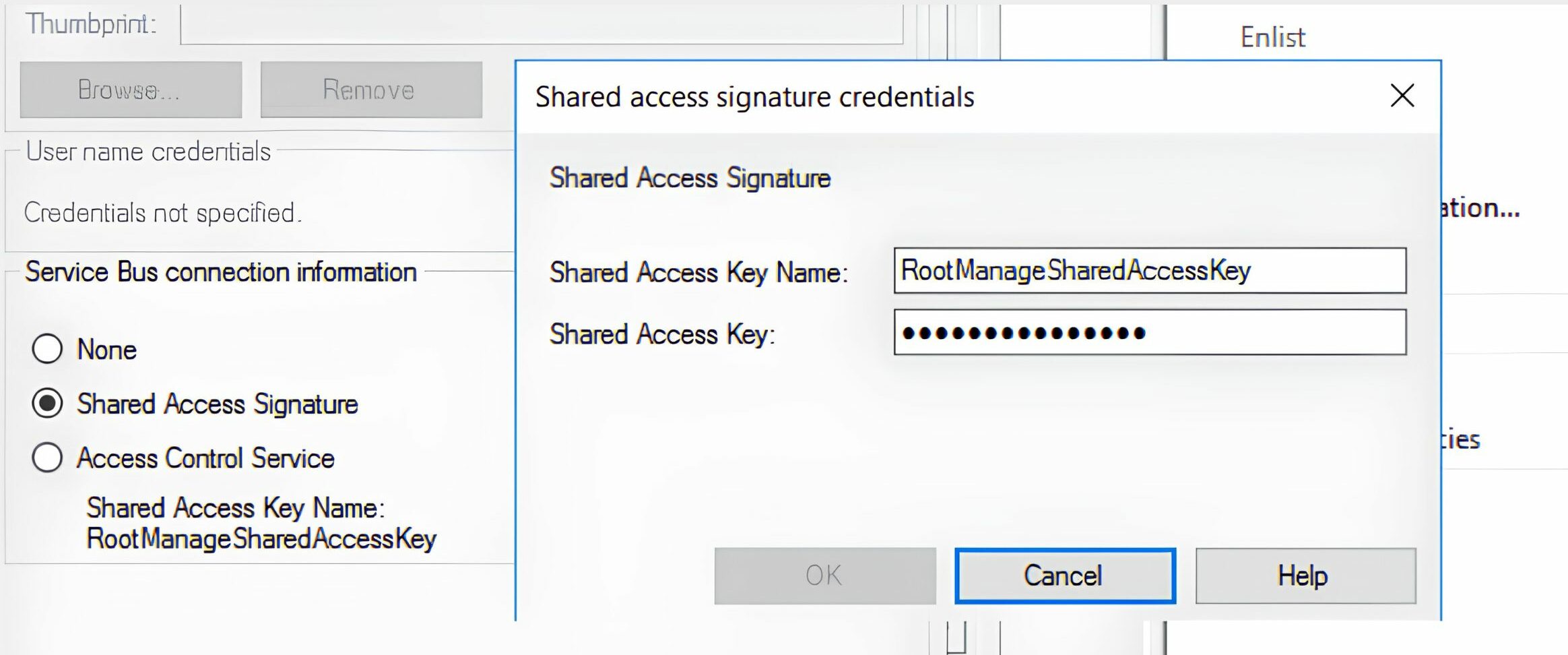
Step 5: Configure Authentication
Under the Security tab, configure Service Bus authentication.
You can use either:
- Shared Access Signature (SAS) (recommended)
- Access Control Service (ACS) (legacy option)
Important: ACS is an older authentication method and should not be used for new BizTalk or Azure Service Bus work. For these integrations, SAS authentication is normally the right option.
Make sure that the configured SAS policy includes the permissions required for the integration scenario, such as Send, Listen, or Manage.
Step 6: Configure Message Headers
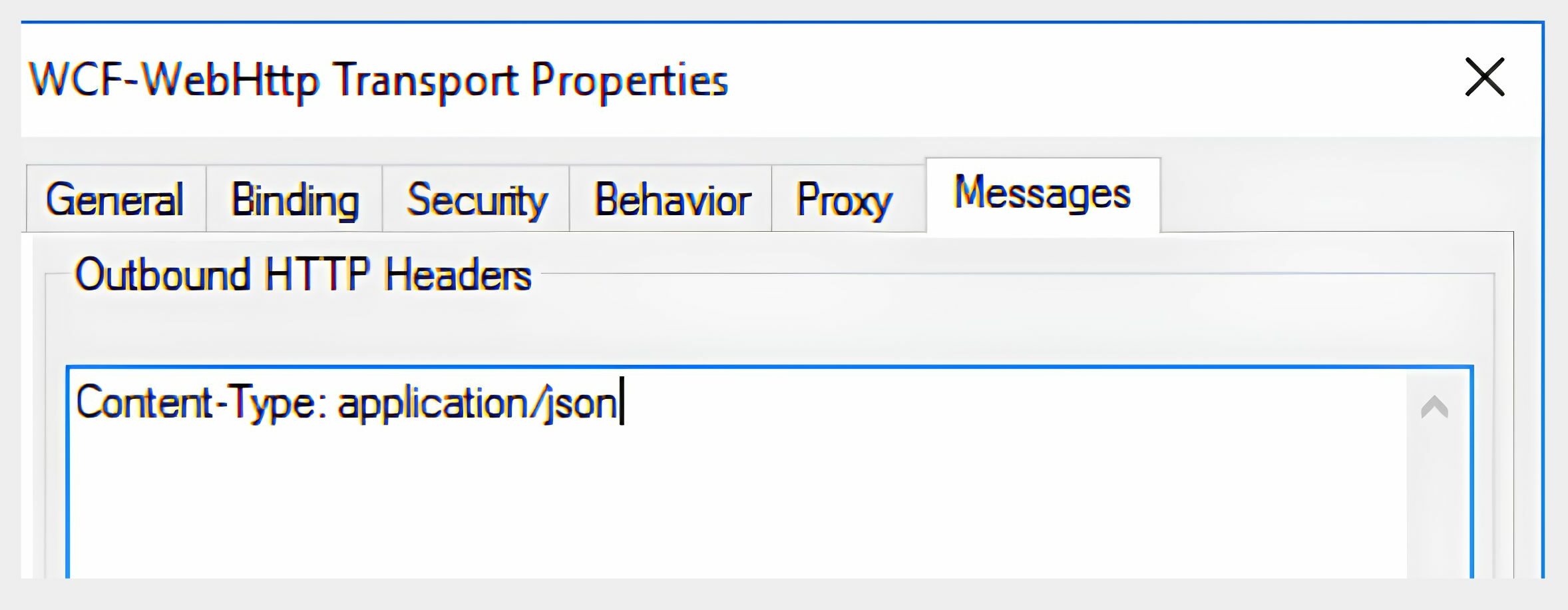
Navigate to: Messages → Outbound HTTP Headers
Content-Type: application/json
Step 7: Apply Changes
- Save the configuration
- Restart BizTalk Host Instances to apply updates
Key Points to Check
Before moving this into production, check the following:
- Make sure the message format is still correct. This may be JSON or XML, depending on what the receiving system expects.
- Test the connection properly in a lower environment before changing production.
- Monitor the Service Bus queues after the change, so failed or delayed messages are noticed early.
- Use SAS authentication rather than ACS. ACS is a legacy option and should generally be avoided.
Inbound Integration Scenarios (Azure Service Bus to BizTalk)
For inbound integrations where messages need to be delivered from Azure Service Bus to BizTalk Server, consider introducing an intermediary component that consumes messages from Azure Service Bus via modern protocols and forwards them to BizTalk through supported adapters.
| Direction Suggested | Suggested Solution |
|---|---|
| Azure Service Bus → BizTalk | Logic App + SFTP |
| Azure Service Bus → BizTalk | Azure Function + File Share |
| Azure Service Bus → BizTalk | Custom .NET Service + File/FTP/SFTP |
Why Is Additional Middleware Required?
The SB-Messaging adapter was the primary mechanism for receiving messages directly from Azure Service Bus in BizTalk. With the retirement of SBMP and the absence of a native BizTalk receive adapter for modern Azure Service Bus communication patterns, inbound integrations may require an intermediary solution.
The intermediary component can be used to:
- Read messages from Azure Service Bus using a supported protocol such as AMQP
- Change or enrich the message before it reaches BizTalk, where this is needed
- Pass the message on to BizTalk through an existing supported adapter, such as File, FTP, or SFTP
The right option will depend on the current environment, operational needs, security requirements, and the longer-term integration plans.
Conclusion
The retirement of SBMP is an important change for BizTalk environments that still use the SB-Messaging adapter for Azure Service Bus integrations.
When BizTalk sends messages out, WCF-WebHttp can often be used to call Azure Service Bus over HTTPS. When messages need to come back into BizTalk, it is usually better to add a layer in between, such as Azure Logic Apps or Azure Functions.
Planning this work in good time will help organisations avoid service interruptions, move to supported Azure communication methods, and complete the transition before SBMP is retired on 30 September 2026.
What is happening to the Service Bus Messaging Protocol (SBMP)?
Microsoft has announced that the Service Bus Messaging Protocol (SBMP) will be retired on 30 September 2026. As a result, the SB-Messaging adapter in BizTalk Server will no longer be supported and may eventually stop working.
Why does the SBMP retirement matter for BizTalk environments?
If a BizTalk environment still uses the SB-Messaging adapter, retirement of SBMP could cause communication failures with Azure Service Bus, downtime in production integrations, and increased difficulty supporting, maintaining, and scaling the solution.
What is the recommended replacement for the SB-Messaging adapter in outbound scenarios?
For outbound integrations where BizTalk sends messages to Azure Service Bus, the WCF-WebHttp adapter is a practical replacement. It allows BizTalk to communicate with Azure Service Bus through HTTPS REST APIs, often without needing to redesign the existing integration.
What other approaches can replace the SB-Messaging adapter besides WCF-WebHttp?
Other options include using Azure Functions as custom middleware, API Management with Azure Service Bus, a hybrid integration model using a middleware gateway, or full cloud modernisation through an event-driven architecture.
What is the correct Service Bus endpoint URI format when using WCF-WebHttp?
The Service Bus endpoint should follow the format https://<servicebus-namespace>.servicebus.windows.net/<queue-name>/messages, configured under General → Address (URI) on the send port, and is used to publish messages directly to the Service Bus queue.
How should the HTTP method and URL mapping be configured?
Under General → HTTP Method and URL Mapping, a BtsHttpUrlMapping configuration should be added specifying the Operation Method as POST, since Azure Service Bus expects message submission via POST requests.
What security settings are required for the WCF-WebHttp adapter?
Under the Security tab, Security Mode should be set to Transport and Transport Client Credential Type should be set to None, ensuring secure communication over HTTPS without requiring client credentials at that layer.
Which authentication method should be used with Azure Service Bus, SAS or ACS?
Shared Access Signature (SAS) is the recommended authentication method, while Access Control Service (ACS) is a legacy option that should not be used for new BizTalk or Azure Service Bus work. The configured SAS policy should include the required permissions, such as Send, Listen, or Manage.
What message headers need to be configured for the migration?
Under Messages → Outbound HTTP Headers, the Content-Type header should be set to application/json to ensure messages are correctly formatted for Azure Service Bus.
How should inbound integrations from Azure Service Bus to BizTalk be handled after SBMP retirement?
Since there is no native BizTalk receive adapter for modern Azure Service Bus communication, an intermediary component such as a Logic App, Azure Function, or custom .NET service is typically required to consume messages using a supported protocol like AMQP and forward them to BizTalk through an existing adapter such as File, FTP, or SFTP.
What should be checked before moving the updated configuration to production?
Before production deployment, teams should verify the message format (JSON or XML) matches what the receiving system expects, test the connection in a lower environment, monitor Service Bus queues after the change for failed or delayed messages, and use SAS authentication rather than the legacy ACS option.
By when should organisations complete their migration away from SBMP?
Organisations should plan and complete their migration before 30 September 2026, when SBMP is retired, to avoid service interruptions and move to supported Azure communication methods.